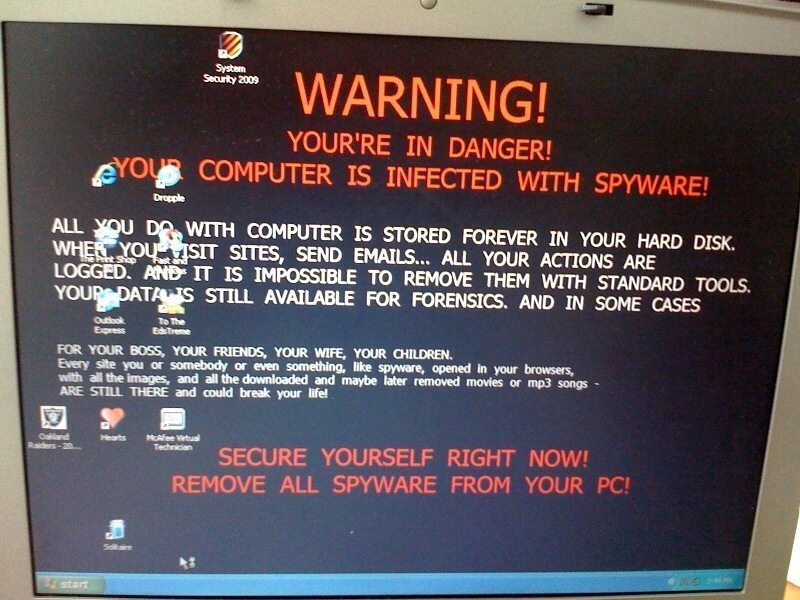
Computer Courage deals with a wide array of spyware and viruses every day, but seldom do they make us laugh like this one.  We recently came across this little gem of a desktop wallpaper in a virus-infected computer.
spyware


The full text reads:

“Warning!

Your’re in danger! Your computer is infected with spyware!

All you do with computer is stored forever in your hard disk. When you visit sites, send emails… all your actions are logged. And it is impossible to remove them with standard tools.  Your data is still available for forensics. and in some cases

For your boss, your friends, your wife, your children. Every site you or somebody or even something, like spyware, opened in your browsers, with all the images, and all the downloaded and maybe later removed movies or mp3 songs – ARE STILL THERE and could break you life!

Secure yourself right now! Remove all spyware form your PC!”

Fabulous stuff.  Someone, somewhere with enough skills to write a functioning computer virus actually got this thing off the ground, and somehow my customer managed to pick it up!   It should also be noted that they are The Print Shop user – a good old school program.

Viruses and spyware are usually no laughing matter.  Many of them attempt to mimic antivirus programs in an attempt to extort money from you.  Don’t be fooled.  If you think you have a virus, contact us to learn more about how to protect yourself.  You can also read some of our relevant posts:

Computer Courage Antivirus Guide – What Are Viruses and Spyware

Phishing – How to Avoid Being Scammed by Email

TrackBack URI | RSS feed for comments on this post

14 Responses

  1. 1 Joel
    2009 Jul 01

    Hahaha, I just got this on one of our pc’s and immediately had to take a picture.

  2. 2 Andrew Evans
    2009 Jul 05

    Too funny! It’s especially odd that it doesn’t promote how to remove the spyware and just lets you know your fudged.

  3. 3 Brooke
    2009 Jul 16

    Yeah, we got this on one of our PCs, too…but how do you get rid of it? I think it’s blocking all access to our other virus scans we already have installed…can you guys help???

  4. 4 adam
    2009 Jul 16

    Try using Malwarebytes Antimalware. You can download it from http://www.download.com. If that doesn’t work, you could try ComboFix. ComboFix is a last resort since it’s a bit rough on your system – use it at your own risk – but it should get rid of the problem. To use it, download it from http://www.bleepingcomputer.com and run it in safe mode. Good luck!

  5. 5 Daniel
    2009 Jul 30

    Just got this, and I’m pretty sure it snuck in through the Adobe PDF vulnerability. It’s a real #$@! of a virus. It shuts down Symanted, Malware Bytes, and Spybot S&D. The bloody thing even prevents startup in safe mode! (no response from ctrl-alt-delete to login)

    Any clues?

  6. 6 admin
    2009 Jul 30

    Hi Daniel, it’s a tricky one. I’ve got a few suggestions:

    1. Start by trying to run MalwareBtyes in Safe Mode. If it won’t run, you can TRY changing the name of the executable file (some viruses know the name mbam.exe).

    2. If this still doesn’t work, you can try ComboFix. WARNING: ComboFix is an intense program and can be a bit rough on the system when removing viruses. Use it at your own risk (it’s our last resort). Learn more about ComboFix at http://www.bleepingcomputer.com. I recommend running ComboFix in Safe Mode, and again you can change the filename if the virus is blocking it. Good luck!

  7. 7 Brando
    2009 Sep 17

    I just got this but i cant get on the internet to download those programs and nothing in my control panel is responsive. any help?

  8. 8 ainesley
    2010 Dec 14

    I just got this yesterday, even though i had norton. the only thing you have to do is restore your computer. do this by first putting it into safe mode and then go to computer, restore settings, and choose how far back you want to restore your computer to. obviously my computer is totally back to normal. i switched to “microsoft essentials” since norton obviously is not effective for protected against virus’s.

  9. 9 Kaiser Soze
    2010 Dec 27

    I just got this exact message. I was able to revert the wallpaper through the properties menu, but is this message actually part of a virus? There is also something seemingly in junction with this called system tool. Is that legit or another attack? FYI I’m using a different laptop right now.

  10. 10 adam
    2010 Dec 28

    Kaiser, just removing the wallpaper will not actually remove the virus. The “system tool” is probably part of the virus. I recommend starting with Malwarebytes Antimalware to try to get rid of the problem, or contacting a professional antivirus removal company such as Computer Courage.

  11. 11 denver from philippines
    2011 Jan 30

    just do system restore on safe mode..

  12. 12 Bryan
    2011 Feb 10

    hey sorry for the language but i’m french and i have this one in my computer too any help for me please?

  13. 13 Chris Creed
    2011 Mar 17

    Hi Guys,

    I removed this using system restore. I had to restart my computer and quickly access control pannel and system restore as the ‘virus’ blocks access to this if you give it some time.

    I didn’t have to download or run anything else.

  14. 14 SCOTT
    2011 Mar 17

    I got this the over day and got system tool come up and found 4 billion viruses (Rubbish) so I just reformatted my laptop, I put this down to Internet Explorer, utterly useless browser!


Leave a reply